ServiceM8 does a lot for its price: quotes, invoicing, payments, customer texts and route optimization are on every plan. Navigrate does far less, on purpose. The real questions are how many jobs you do each month and whether you need the back office in the same app.
Who wrote this: Navigrate. We've tried to be fair: ServiceM8's facts come from its own website, and we say plainly where it does more than we do.
The short answer
- You want quotes, invoicing, payments and customer texts in the same app
- Your job count fits its plan (50 jobs a month on Starter, 150 on Growing)
- Your field staff are on iPhones, where its full app runs
- You want route optimization: Auto Routing is on every plan
- You already handle quotes and invoices somewhere else
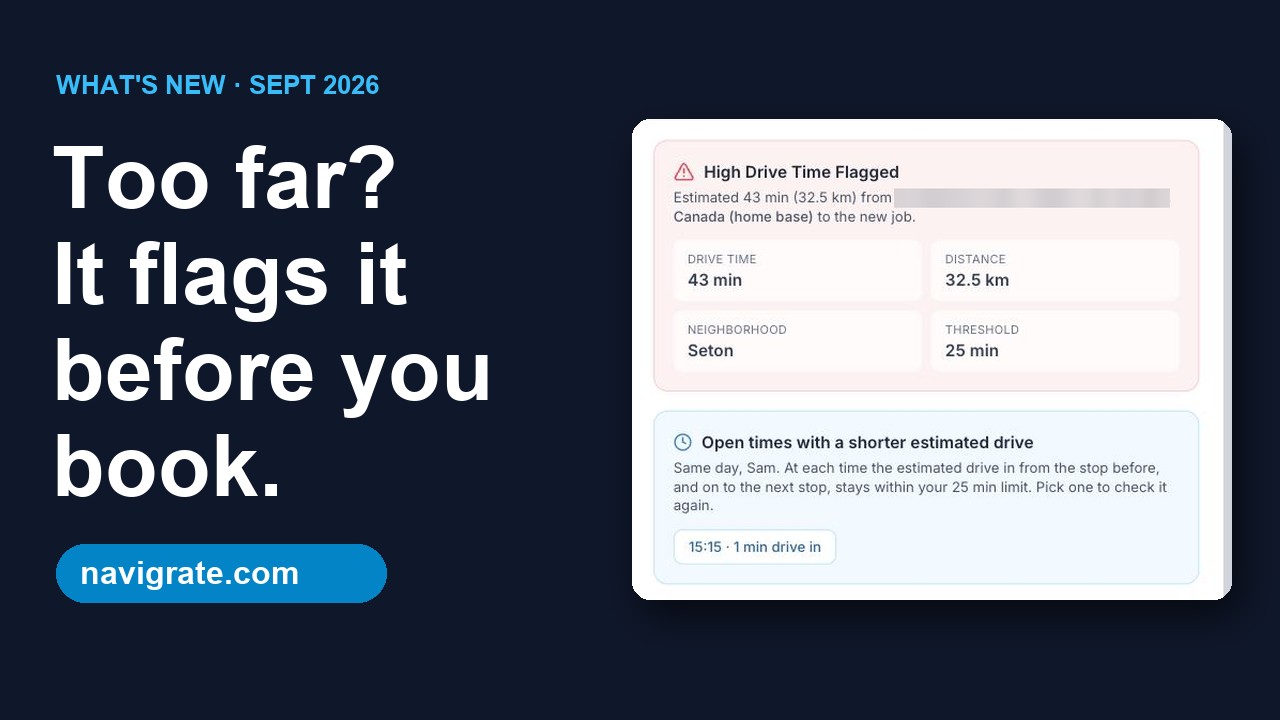
- You want a flag on any booking whose drive runs past a limit you set
- You want a price set by crew size, whatever your job count: $29 a month for 3 technicians
Side by side
| Navigrate | ServiceM8 | |
|---|---|---|
| How it's priced | By technicians on your roster: Solo $19 (1), Starter $29 (3), Team $69 (10), Business $129 (25) a month. No job limits. | By jobs a month, with unlimited users on paid plans: Free (30 jobs, 1 user), Starter $29 (50), Growing $79 (150), Premium $149 (500), Premium Plus $349 (1,500, then 20¢ a job). |
| Free trial | 14 days, up to 3 technicians, no card | 14 days, no card, plus a free plan for up to 30 jobs a month |
| Quotes, invoicing and payments | No | Yes, on every plan, with Xero, QuickBooks Online and MYOB sync |
| Customer texts and online booking | No | On-the-way texts, booking reminders and online booking on every plan (texts cost 10¢ each on the Free plan) |
| Route optimization | No. It checks each booking's drive as you make it | Auto Routing and a dispatch map on every plan |
| Drive time when booking | Flags any booking whose estimated drive from the tech's previous booking or home base runs past a limit you set | Booking Suggestions offer times that allow for travel time from previous jobs |
| Apps for field staff | No technician logins yet. The board runs in any browser for whoever is signed in | Full app on iPhone and iPad. Staff on Android get ServiceM8 Lite, which shows only their own jobs and can't take payments in the field |
| Contract | Monthly or yearly. Monthly plans cancel anytime | No lock-ins |
ServiceM8 facts checked on its own site 16–17 Sep 2026: servicem8.com/us/pricing · ServiceM8 Lite help article · Booking Suggestions help article
What a 3-technician shop pays each month, by job count
| Jobs a month | Navigrate | ServiceM8 |
|---|---|---|
| Up to 50 | $29 (Starter) | $29 (Starter) |
| 51 to 150 | $29 | $79 (Growing) |
| 151 to 500 (3 techs doing 3 jobs a day each is about 190) | $29 | $149 (Premium) |
| 501 to 1,500 | $29 | $349 (Premium Plus) |
Monthly billing, US dollars, checked on each vendor's pricing page 16–17 Sep 2026. ServiceM8 includes quotes, invoicing, payments and customer texts at every price; Navigrate doesn't include any of those.
Where ServiceM8 does more
- Quotes, invoicing and payments, with accounting sync
- Customer texts, reminders, feedback requests and online booking
- Route optimization, staff GPS and booking suggestions that allow for travel time, on every plan
- A free plan for very small job counts, and apps for field staff
Where Navigrate fits
- A flag on any booking whose estimated drive runs past a limit you set
- A price that stays the same as your job count grows
- Less to set up: add technicians and start booking
What Navigrate doesn't do
- Quotes, invoicing, payments or a customer database. Keep your accounting tool for those.
- Route optimization. It won't re-order a day's stops; it checks each booking's drive as you make it.
- Real road distances or traffic. The drive check is a fast straight-line estimate.
- Importing jobs or customers. Jobs are added as you book them for now.
- Customer reminders or texts, or repeating jobs.
- A phone app. Navigrate runs in any web browser, including on a phone.
- Give technicians their own logins or app.
Switching, honestly
There's no import into Navigrate yet. Enter next week's jobs by hand and run both side by side for a week before you decide.
If you leave ServiceM8 completely, you'll need somewhere else for quotes, invoices and customer texts.
See Navigrate in under 90 seconds
Every screen is from the real app and website: the long-drive flag, bookings up to 12 hours, and pricing.
Common questions
Is ServiceM8 cheaper than Navigrate?
Does ServiceM8 work on Android?
Does Navigrate have an app for technicians?
Can I use Navigrate and ServiceM8 together?
How were these facts checked?
More comparisons: compare Navigrate with Jobber, Housecall Pro and others.
Try the drive check on next week's jobs
14 days free, every feature, up to 3 technicians. No card needed.
Start your free trial → 3 technicians = $29/mo · every feature on every plan