These two solve different problems, and some shops could use both. Connecteam is about the people: who's working, when they clocked in, and what they filled out. Navigrate is about the bookings: which tech takes the next job, and how far they'll drive to get there.
Who wrote this: Navigrate. We've tried to be fair: Connecteam's facts come from its own website, and we say plainly where it does more than we do.
The short answer
- You need a GPS time clock or forms
- Your team needs its own app on iPhone or Android
- You want to start on a free plan
- Shifts matter more to you than where each customer job is
- You book customer jobs into time windows all day
- You want to see the drive from the tech's previous job before you commit to a time
- You want a map of each tech's booked stops for the day
Side by side
| Navigrate | Connecteam | |
|---|---|---|
| Price | Solo $19 (1 technician), Starter $29 (3), Team $69 (10), Business $129 (25) a month; about 30% less billed yearly | Free Small Business plan for up to 10 users (active and archived) with every feature; its pricing FAQ also describes a free Limited plan for up to 30 users. Operations Hub for the first 30 users: Basic $35, Advanced $59, Expert $119 a month, or $29, $49 and $99 billed yearly, then a small fee per extra user |
| Free trial | 14 days, up to 3 technicians, no card | 14 days on paid plans, no card |
| Scheduling | Customer bookings per technician: name, address, time and length | Shifts or jobs with a location, instructions and files, viewed by person or by job, with drag-and-drop |
| Drive between jobs | Estimated drive from the previous booking or home base, flagged against your limit as you book | Its field-services page talks about accounting for drive time between jobs; we couldn't find an automatic drive estimate described on its site |
| Map | A map of one technician's booked stops for the day | A time clock map on the web dashboard: clock-in spots, job pins and GPS breadcrumbs |
| GPS time clock | No | Yes, with geofences (up to 10 on Advanced, unlimited on Expert) |
| Apps for staff | No technician logins yet. The board runs in any browser for whoever is signed in | iPhone and Android apps |
| Quotes and invoicing | No | Not listed on its pricing page |
Connecteam facts checked on its own site 16–17 Sep 2026: connecteam.com/pricing · Job scheduling help article · Field services page
Where Connecteam does more
- A GPS time clock with geofences
- Forms and quick tasks
- Apps for every team member on iPhone and Android
- A free plan for up to 10 people
Where Navigrate fits
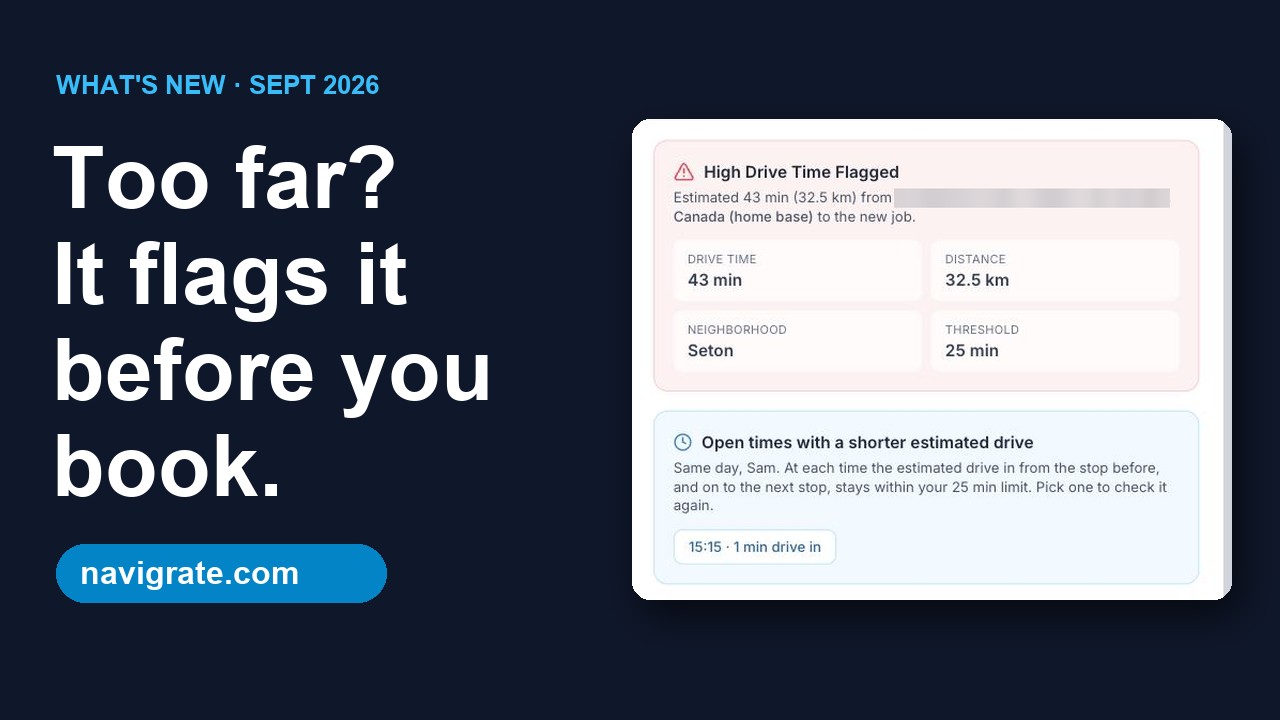
- A drive check as you book each customer job, against a limit you set
- Up to three open times with a shorter estimated drive when a booking is flagged, when it finds them
- A map of each tech's booked stops for the day
What Navigrate doesn't do
- Quotes, invoicing, payments or a customer database. Keep your accounting tool for those.
- Route optimization. It won't re-order a day's stops; it checks each booking's drive as you make it.
- Real road distances or traffic. The drive check is a fast straight-line estimate.
- Importing jobs or customers. Jobs are added as you book them for now.
- Customer reminders or texts, or repeating jobs.
- A phone app. Navigrate runs in any web browser, including on a phone.
- Track time, clock-ins or GPS location.
- Give technicians their own logins or app.
Switching, honestly
You don't have to switch. If Connecteam already runs your time clock and forms, you could keep it for that and book customer jobs in Navigrate, though the two don't connect.
There's no import into Navigrate yet. Enter next week's jobs by hand and try it for a week.
See Navigrate in under 90 seconds
Every screen is from the real app and website: the long-drive flag, bookings up to 12 hours, and pricing.
Common questions
Is Connecteam really free?
Does Connecteam plan routes?
Can I use Connecteam and Navigrate together?
Does Navigrate track where my techs are?
How were these facts checked?
More comparisons: compare Navigrate with Jobber, Housecall Pro and others.
Try the drive check on next week's jobs
14 days free, every feature, up to 3 technicians. No card needed.
Start your free trial → 3 technicians = $29/mo · every feature on every plan