Jobber is a solid all-in-one suite. Small shops usually start looking when the price for a team, or the amount of software, stops matching what they actually use. Here are six real alternatives, plus the case for staying.
Who wrote this: Navigrate, one of the options below. We've tried to be fair: every price links to the vendor's own page, and we say plainly where others do more than we do.
Reasons to compare
- Team pricing: Core is for 1 user, so a 3-person team starts at Connect, $199 a month billed monthly.
- Routing and GPS start on Connect, not Core.
- Below the Plus plan, extras such as Receptionist, Pipeline and Marketing Suite are paid add-ons.
- Some shops mostly need a clear schedule and don't use quotes, invoicing and a client hub every day.
Quick picks
What a 3-technician shop pays
| Tool | Plan for a 3-tech shop | Per month, billed monthly | Routing on that plan |
|---|---|---|---|
| Navigrate | Starter, up to 3 technicians | $29 | No route optimization; drive check on every booking and a map of each tech's stops |
| Jobber | Connect, 2–5 people | $199 | Route optimization and GPS |
| Housecall Pro | Essentials (5 users) · MAX (8 users) | $189 · $329 | Routes and GPS map on Essentials; route optimization on MAX |
| ServiceM8 | Priced by jobs: Starter (50/mo) · Growing (150) · Premium (500) | $29 · $79 · $149 | Auto Routing and dispatch map on every plan |
| GorillaDesk | Basic · Pro, 3 routes | $149 · $199 | Routing (25-stop limit on Basic); drive matrix and GPS on Pro |
| QuoteIQ | Pro (4 users) · Elite (10 users) | $149.99 · $299 | Travel-distance ribbon on Pro; dispatching and route optimization on Elite |
| Connecteam | Small Business, up to 10 users | $0 | None listed; shift and job scheduling with GPS clock-in |
Cheapest plan that covers 3 people or trucks, with the plan that adds route optimization where it differs. Prices in US dollars, checked on each vendor's pricing page 16–17 Sep 2026. Vendors count users, jobs and routes differently, so confirm on their site before you decide.
The options
Housecall Pro
An all-in-one suite for residential home-service pros: scheduling, dispatch, estimates, invoicing and payments, with routes on Essentials and one-click route optimization on MAX.
- Best for
- Residential service shops that want estimates, invoicing, payments and dispatch in one app.
- Pricing
- Basic $79 (1 user), Essentials $189 (5 users), MAX $329 (8 users, then $35 a month per extra user) a month; $59, $149 and $299 a month billed yearly. Some add-ons, such as AI call answering, payroll and dashcams, are priced separately.
- Routing
- Scheduling and dispatch on every plan. Routes and a GPS map of your team start on Essentials. One-click route optimization is on MAX.
- Watch for
- Basic covers 1 user, so a 3-person team usually starts at Essentials. Introductory offers come and go; compare the regular price.
ServiceM8
A job management suite priced by the number of jobs you do each month, with unlimited users on paid plans and Auto Routing on every plan.
- Best for
- Low-volume shops on iPhones that want quotes, invoicing and routing together, priced by jobs rather than people.
- Pricing
- Free (30 jobs a month, 1 user), then unlimited users: Starter $29 (50 jobs), Growing $79 (150 jobs), Premium $149 (500 jobs), Premium Plus $349 (1,500 jobs, then 20¢ a job) a month.
- Routing
- Scheduling, a dispatch map and Auto Routing are listed on every plan, including Free.
- Watch for
- The price follows your job count. Three techs doing 3 jobs a day each is about 190 jobs a month, which is Premium ($149). The full app is built for iPhone; staff on Android get the Lite app.
GorillaDesk
Field service software for route-based businesses such as pest control, lawn care and pool service, priced per route.
- Best for
- Pest, lawn and pool businesses that run recurring routes.
- Pricing
- Priced per route. For 3 routes: Basic $149, Pro $199, Growth $299 a month. Admin users are unlimited; SMS is an add-on.
- Routing
- Basic includes routing limited to 25 stops. Pro adds routing with a drive matrix and GPS tracking. Growth adds drive time and best-available-time suggestions.
- Watch for
- Built around recurring routes; check it suits one-off service calls. The 25-stop routing limit on Basic.
QuoteIQ
An all-in-one app for home-service businesses such as lawn care and cleaning, priced by number of users.
- Best for
- Lawn, cleaning and similar home-service shops that want quoting, invoicing and scheduling in one app.
- Pricing
- Essentials $29.99 (1 user), Beginner $74.99 (2), Pro $149.99 (4), Elite $299 (10), Max $699 (unlimited) a month. Yearly billing is advertised as paying for 10 months.
- Routing
- Scheduling and a travel-distance ribbon between stops on every plan. Dispatching and route optimization are on Elite and Max only.
- Watch for
- A 3-person team needs Pro ($149.99), and dispatching and route optimization need Elite ($299).
Connecteam
A workforce management app for deskless teams: shift and job scheduling, GPS time clock, checklists and team chat.
- Best for
- Teams that mainly need shift scheduling, a time clock and checklists, not location-aware booking.
- Pricing
- Free Small Business plan for up to 10 users. Operations Hub for the first 30 users: Basic $35, Advanced $59, Expert $119 a month, or $29, $49 and $99 a month billed yearly.
- Routing
- Shift schedules with jobs attached, GPS clock-in and geofences. Its pricing page lists no route planning or drive check.
- Watch for
- It's a shift scheduler, not a dispatch board; its pricing page lists nothing that checks the drive between a tech's jobs.
Stay on Jobber
A full back-office suite for home-service businesses: quotes, invoicing, payments, client hub, scheduling and, on Connect and up, GPS and route optimization.
- Best for
- You use its quotes, invoicing and payments every day and the price works for you. Switching tools has a cost too.
- Pricing
- Teams of 2 to 5 people (5 users included): Connect $199, Grow $299, Plus $499 a month, or $149, $229 and $399 a month billed yearly. For 1 user: Core $49, Connect $139, Grow $199 a month. Below Plus, add-ons such as Receptionist ($29), Pipeline ($49) and Marketing Suite ($99) cost extra.
- Routing
- Routing and GPS start on Connect; Core has neither. Route optimization re-orders anytime visits (no set start time) for up to 7 days at a time.
- Watch for
- Core is for 1 user only, so a 3-person team starts at Connect.
What Navigrate doesn't do
- Quotes, invoicing, payments or a customer database. Keep your accounting tool for those.
- Route optimization. It won't re-order a day's stops; it checks each booking's drive as you make it.
- Real road distances or traffic. The drive check is a fast straight-line estimate.
- Importing jobs or customers. Jobs are added as you book them for now.
- Customer reminders or texts, or repeating jobs.
- A phone app. Navigrate runs in any web browser, including on a phone.
Switching, honestly
There's no import into Navigrate yet. Enter next week's jobs by hand and run both tools side by side for a week before you decide.
If you leave Jobber completely, you'll need somewhere else for quotes and invoices, such as your accounting software. Navigrate doesn't do those.
Check your Jobber plan's billing terms before you cancel, especially if you're on a yearly plan or a 1-year commitment.
Navigrate's trial is 14 days with every feature, up to 3 technicians, and no card.
See Navigrate in under 90 seconds
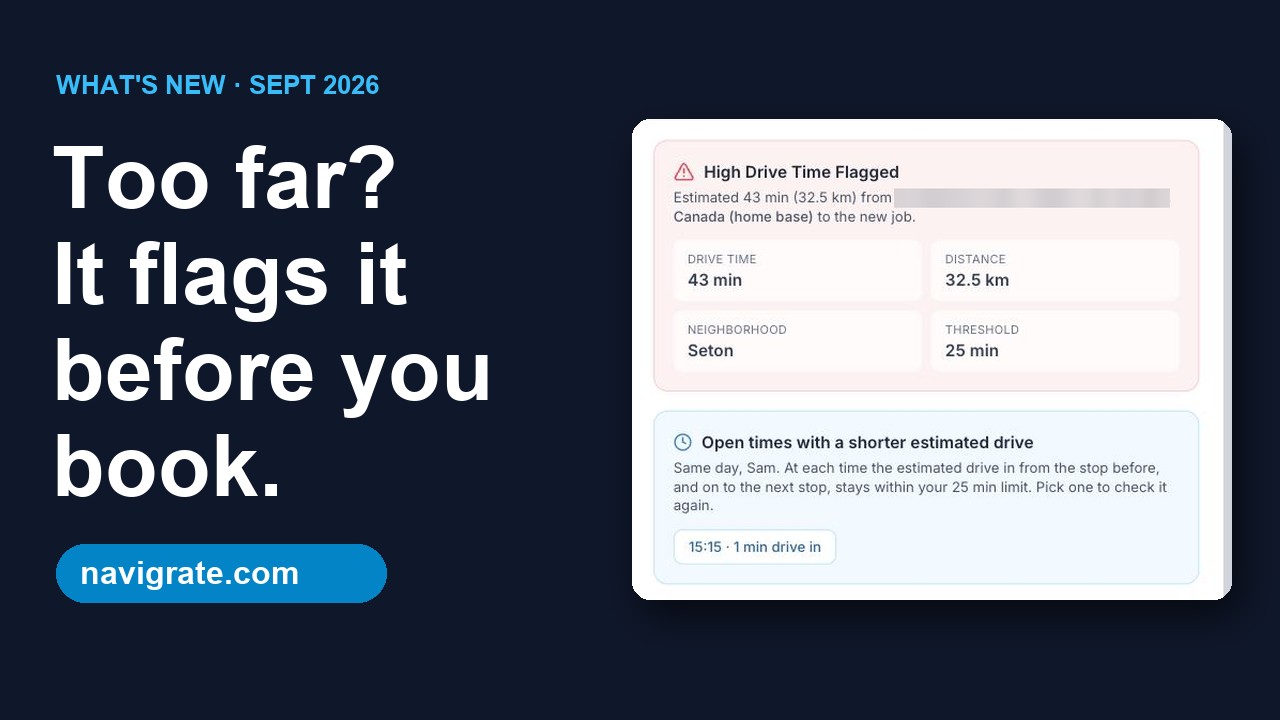
Every screen is from the real app and website: the long-drive flag, bookings up to 12 hours, and pricing.
Common questions
What's the cheapest Jobber alternative with route optimization?
Does Jobber have route optimization?
Is Navigrate a full Jobber replacement?
Can I use Navigrate and Jobber together?
How were these prices checked?
Try the drive check on next week's jobs
14 days free, every feature, up to 3 technicians. No card needed.
Start your free trial → 3 technicians = $29/mo · every feature on every plan